Point Of Sale
To streamline our organization’s operations, we have implemented several enhancements on top of the standard ERPNext functionalityto enhance functionality and improve the customer experience, such as:
- POS setups: Single-Screen POS and Double-Screen POS
- Discount Facility for Employee and Customers
- Sales Representative details and Additional Remarks Data Capturing
These features vary across different POS setups, depending on specific user requirements.The table below summarizes the POS functionalities, with detailed explanations of each feature provided in the sections that follow.
👥 Authorized Actions by Role
- VCM FO Exec(Cashier): Operates POS, applies discounts, records details.
- ERP Manager : Maintains Items and Sales Rep Master Data, configures POS settings and POS Profiles.
| POS Name | Company | MOP | Cashier Name |
|---|---|---|---|
| Gita counter POS | TSF | Cash , UPI , Pushpanjali Coupon | gitacounter@vcm.org.in |
| Krishna Counter POS | TSF | Cash , UPI | krishnacounter@vcm.org.in |
| Balram Counter POS | TSF | Cash , UPI, BM_Coupon | balramcounter@vcm.org.in balramcounter1@vcm.org.in |
| Jagannath Counter POS | TSF | Cash , UPI | jagannathcounter@vcm.org.in |
| Narsimha Counter POS | TSF | Cash , UPI | narsimhacounter@gmail.com |
| Pushpanjali POS | VCMT | General Method | ps_pos@gmail.com |
| Annakoot POS | TSF | General Method | maneesh.kumar@vcm.org.in |
| Brajras POS | TSF | General Method | jaythakur2001@gmail.com |
| Rajbhog POS | VCMT | Cash , UPI | rajbhog_user@gmail.com |
| Krishna Prasadam Counter | HKM | Cash , UPI | kp_pos@gmail.com |
| Noida POS | TSF | Cash , UPI | btdd@vcm.org.in |
| Gurugram POS | TSF | Cash , UPI | ramakant.jena@vcm.org.in gaurav.jain@vcm.org.in |
| Special Events- Merchandise POS | TSF | Cash , UPI | specialeventcashier@vcm.org.in |
📋 POS Counter with Available Features
| POS Name | Customer Discount | Employee Discount | Double Screen | Sales Rep Details | Print Invoice |
|---|---|---|---|---|---|
| Krishna Counter POS | Yes | Yes | Yes | Yes | No |
| Balram Counter POS | Yes | Yes | Yes | Yes | No |
| Narsimha Counter POS | Yes | Yes | Yes | Yes | No |
| Jagannath Counter POS | Yes | Yes | Yes | Yes | No |
| Gita Counter POS | Yes | Yes | Yes | Yes | No |
| Annakoot POS | Yes | Yes | No | No | No |
| BrajRas POS | No | No | No | No | No |
| Rajbhog POS | No | No | Yes | No | No |
| Pushpanjali POS | Yes | Yes | No | No | No |
| Krishna Prasadam Counter | No | No | Yes | No | No |
| Surabhi POS | No | No | Yes | No | No |
| Noida POS | Yes | Yes | Yes | Yes | Yes |
| Gurugram POS | Yes | Yes | Yes | Yes | Yes |
| Special Events- Merchandise POS | No | No | Yes | Yes | Yes |
🏷️ Discount at Counter
🏷️ Discount Facility for Customer
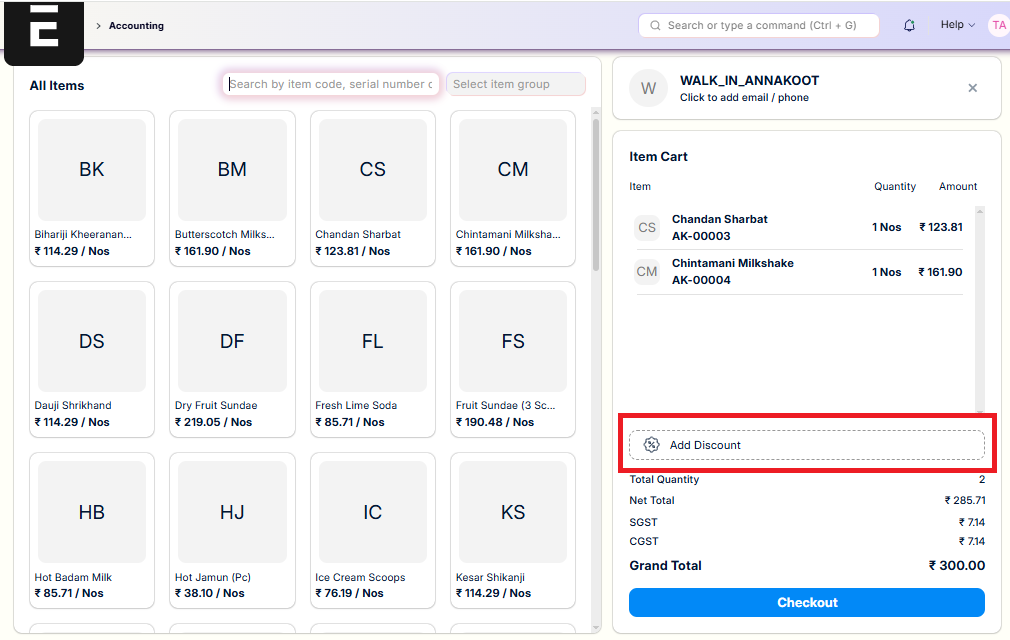
The POS includes a discount feature that allows authorized cashiers to apply discounts directly at the counter during billing for customerson the first screen of the POS.
Required Role : POS Discount Manager
Key highlights of this feature:
- Cashiers can record customer details (e.g., name and contact) for proper tracking.
- Discounts can be applied:
- As a percentage of the total bill.
- As a fixed amount deducted from the total.
🏷️ Discount Facility for Employees
The POS provides a feature to offer discounts to employees, applicable on the first screen.
Required Role : POS Discount Manager
Report : Employee Monthly Discount Usage - available at the provided link. link text
Key highlights of this feature:
- Cashier can select the employee name from a drop-down list.
- Default employee discount is 10%.
- Maximum monthly discount limit:
- ₹1000 on Gifts and Books counters.
- If the first purchase exceeds ₹1000, the system allows it but shows a negative balance; further discounts are blocked once the limit is exceeded.
- No fixed monthly discount limit is set for Annakoot.

📝 Sales Representative Details & Remarks
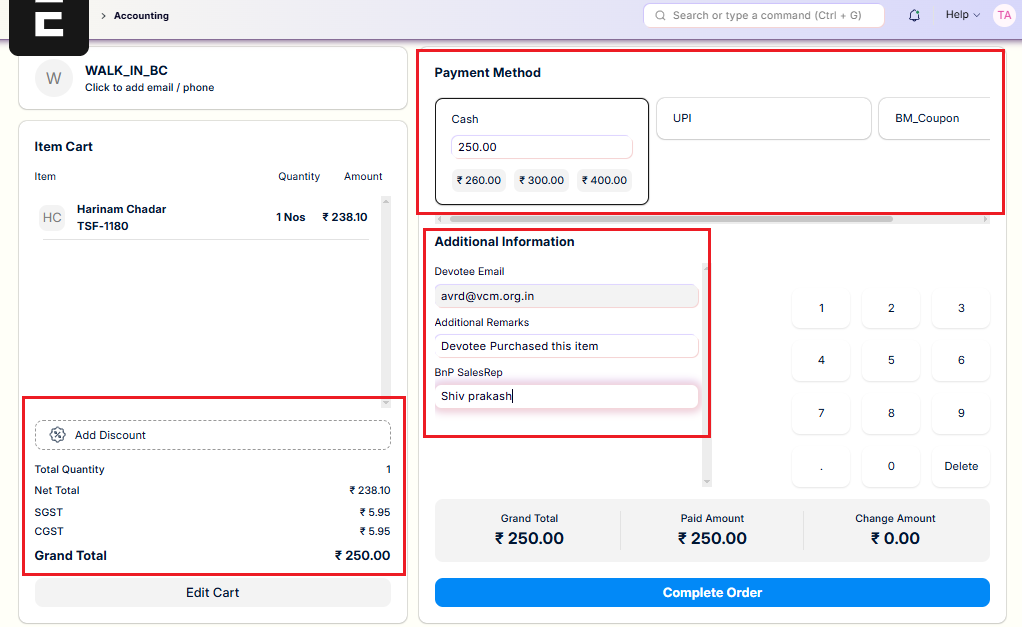
In the Double-Screen POS setup, the second screen captures additional details before finalizing the order.
Key features:
- ✅ Devotee Details: Record devotee information for the transaction.
- ✅ Additional Remarks: Add special instructions or comments.
- ✅ Sales Representative: Record the sales representative’s name for accountability.
- ✅ Change Payment Mode: Switch between Cash, UPI, etc.
- ✅ Discounts: Apply customer or employee discounts (percentage or fixed amount).