Event Hospitality App Introduction
🔰 Overview
The Event Hospitality app is a custom ERPNext application designed to streamline and manage hospitality processes during events. It supports event-specific workflows and ensures seamless coordination between different hospitality checkpoints using role-based access.
👥 User Roles & Permissions
The application is role-based, and each user has access only to the functionalities relevant to their responsibilities.
| Role Name | Responsibility |
|---|---|
| Event Master Manager | Oversees the entire process, manages event configurations and invite guests |
| Event Host | Coordinates with guests / reception and Bahumana desk during the event |
| Event Volunteer | Handles guest check-ins and basic information capture |
| Event Bahumana Distributor | Manages the distribution of bahumana kits |
🧭 Application Workflow
The application operates through a structured 4-step process, and at each step, every team has its own dedicated screen, ensuring a clear separation of duties.
Users are restricted to their roles and cannot perform tasks assigned to other teams, maintaining accountability and process integrity.
Step 1: Create Event Master Data (By Event Master Manager)
- Create Event Master with basic details (event name, date, location).
- Set up Wrist Band Allocation Master to define color codes or identifiers.
- Set up Bahumana Allocation Master for items/kits to be distributed.
- Prepare and upload Excel files (if applicable) for general invitees.
Step 2: Create & Send Invites (By Event Master Manager / Event Host)
- Consolidate invitees from multiple sources:
- Donation Receipts
- FPDA List
- General Invite Upload
- Use integration tools to send WhatsApp messages or SMS to guests with event details and invitations.
Step 3: Reception Desk Operations (By Event Volunteer)
- Operated through the Reception Screen.
- Search the invited guest or Register the walk-in guests.
- Assign wristbands / Patka / Entry Pass as displayed on the screen based on allocation rules.
- Fill the number of wrist band given to the guest
Step 4: Bahumana Desk Operations (By Event Bahumana Distributor)
- Operated through the Bahumana Counter Screen.
- Search the invited guest
- Distribute Bahumana (gift kits) displayed on the screen based on allocation rules.
- Mark items as delivered to avoid duplication.
📊 Shared Dashboard
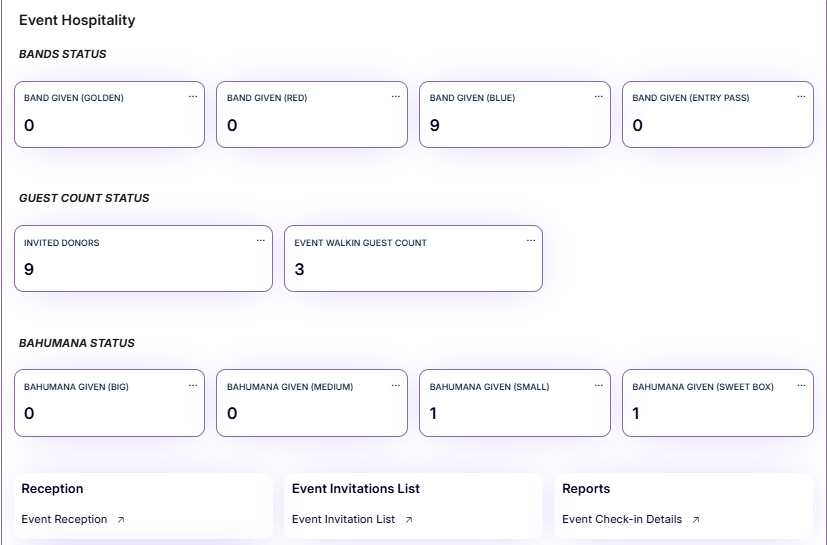
A common dashboard is available and visible to all user roles. This dashboard is refreshed daily at 12 midnight, ensuring updated insights after each day of the event.
This dashboard provides live tracking during the event and helps all roles stay aligned with real-time progress.
Dashboard Displays:
- BANDS STATUS : Number of wristbands distributed
- GUEST COUNT STATUS : Total number of invited guests
- BAHUMANA STATUS Number of Bahumana distributed (This will not be refreshed everyday.This will remain the same throughout the festival untill the festival is closed)
🖥️ Screens
Each role has access only to their designated screen but Dashboard will be visible to everyone.
1. Event Master Manager Screen
- Create events and master data
- Upload invitee lists
- Send messages
- Monitor event progress
- View reports
Please refer Event Master Manager Page for detailed Process
2. Event Host Screen
- View guest details
- Record hospitality services provided
Please refer Event Host Page for detailed Process
3. Reception Screen
- Guest check-in and validation
- Assign wristbands
Please refer Reception Volunteer Page for detailed Process
4. Bahumana Counter Screen
- Show checked-in guest list
- Distribute Bahumana items and mark delivery
Please refer Bahumana Volunteer Page for detailed Process
📊 Report
Event Check-in Summary Report Will be visible only to the authorised users
- Provides an overview of the event attendance, services availed, and distribution status.
- Exportable to Excel or PDF.
⚙️ Configuration & Setup
- Create an Event Master entry (By Event Master Manager)
- Assign users to respective roles using Role Assignment (By ERP Team)
- Configure Bahumana items and service types from master data (By Event Master Manager)
- Define event schedule and related workflows (By Event Master Manager)
📎 Usage Guidelines
- Each team uses its designated screen only.
- Strict access control ensures one role cannot interfere with another’s task.
- Event Master Manager has full oversight and configuration rights.
- Live updates and tracking ensure smooth event operations.