HallBooking
🏛️ HallBooking App – User Guide
Welcome to the HallBooking Module in the Mobile App – your official tool for managing hall availability and submitting booking requests within Vrindavan Chandrodaya Mandir.
📋 What is the HallBooking App?
The HallBooking App allows users to:
- 🗓️ Check hall availability based on date and time
- 📝 Submit booking requests for events, meetings, or programs
- 🔄 Track the status of submitted booking requests
- 📅 View upcoming bookings via the calendar interface
- ✅ Cancel booking if needed restricted hall bookings
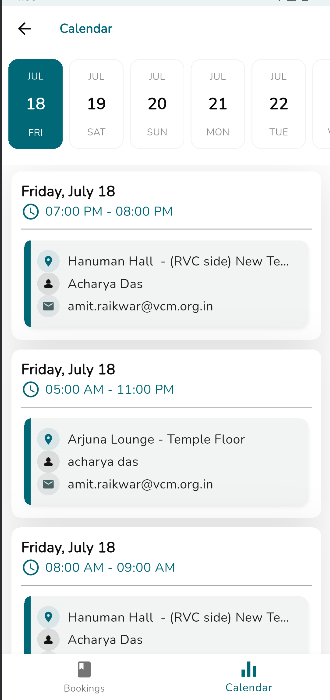
Live calendar to check availability
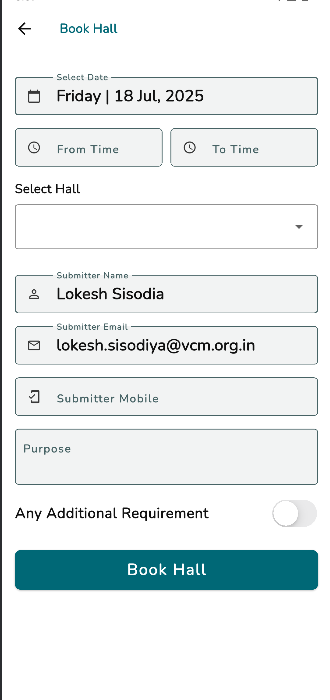
Create booking with purpose, date, and time
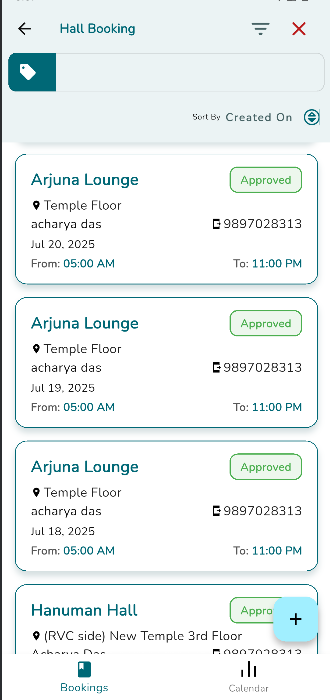
Booking List – See all your bookings
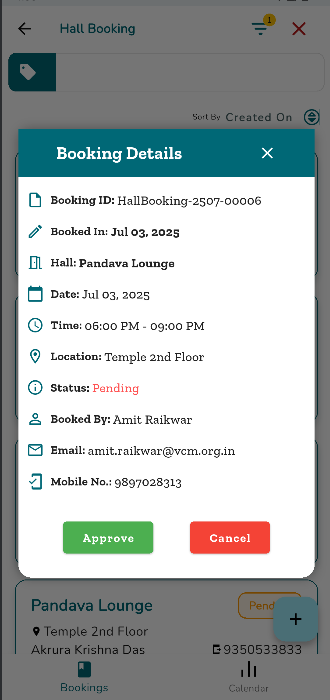
Booking Details – View, Cancel, or Approve
⚙️ Key Features
🗓️ Live Availability
Instantly check which halls are free using the built-in calendar.📝 Easy Booking Flow
Submit booking requests with event purpose, date, start & end time.🔔 Real-Time Alerts
Get notified via Email/WhatsApp when your request is approved or rejected.
👥 Who Can Use the App?
All ERP Users
✅ Benefits
- 🚫 Avoid double bookings or conflicts
- 🤝 Improve internal coordination
- ⏱️ Save time with digital workflows
- 🧾 Maintain a centralized record of hall bookings
❓ Need Help?
Please contact the ERP Team